Make Waves with the Ocean Text Effect
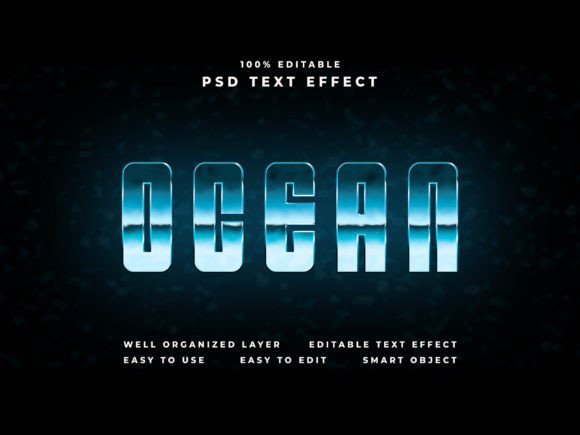
There’s a certain magic to the ocean—the way light dances on the surface, the depth of its blues, and the sense of endless possibility it evokes. Now, imagine capturing that dynamic, fluid energy and applying it directly to your typography. The Ocean Text Effect is more than just a font style; it’s a transformative design asset that allows you to present text, shapes, or logos with a cool, immersive aesthetic. It’s designed for creators who want to make an immediate visual impact without spending hours on complex layer styles. By simply placing your design into a smart object, you can achieve a stunning result that feels both professional and effortlessly cool.
A Versatile Tool for Modern Creators
This effect isn’t confined to one type of project. Its true strength lies in its adaptability. Think about the last time you scrolled through social media and stopped on a post because the text felt alive. That’s the kind of engagement a premium text effect can generate. For a small business owner launching a summer sale, it can turn a simple announcement into a vibrant poster or a captivating Facebook cover. For a content creator, it can elevate a YouTube banner or a website header, making the channel instantly recognizable. The included Photoshop file is compatible with CC and comes with well-organized layers, making the editing process intuitive. The 4000x6000 pixel resolution at 300 dpi ensures your designs look crisp and detailed, whether they’re viewed on a high-resolution screen or printed as a large-format flyer.
From Digital Screen to Physical Product
The applications extend far beyond digital screens. Imagine using this effect for product packaging that needs to stand out on a crowded shelf. The watery, textured look could be perfect for a beverage brand, a skincare line with ocean-derived ingredients, or a summer-themed collection. For event planners or individuals, it can create breathtaking invitations for a destination wedding or a beach party, setting the tone before the first guest arrives. Even in editorial design, a magazine spread or a blog feature about travel or lifestyle can use this typography to add a layer of visual storytelling. The key is matching the effect’s personality—dynamic, refreshing, and slightly bold—to the project’s core message.
Integrating the Effect into Your Design Workflow
Adopting a new design asset should streamline your process, not complicate it. This is where the practicality of a well-prepared PSD file shines. The process is straightforward: open the smart object, place your vector shape or text, save, and watch the effect apply automatically. This "easy and fast editing" means you can experiment with different logo concepts or headline treatments in minutes. It’s a valuable addition to any designer’s toolkit of creative assets, especially when working under tight deadlines.
However, a tool is only as good as the strategy behind its use. Consider these practical tips for implementation:
- Context is Key: The Ocean Text Effect has a distinct visual personality. It’s ideal for themes related to water, summer, freshness, adventure, or tranquility. It might feel out of place for a corporate law firm’s annual report but could be perfect for a surf shop’s branding.
- Readability First: While the effect is visually striking, ensure your final text remains legible. Test it at smaller sizes if it’s destined for a website’s subheading or a business card. The included 4K resolution helps, but always check the end-use context.
- Pairing for Balance: To avoid visual overload, pair this display-style effect with a cleaner, simpler sans-serif or serif font for body copy. This creates a hierarchy that guides the viewer’s eye, using the ocean effect for impact and a neutral font for information.
- Check the License: The package includes a helpful PDF on usage and a font text file. Always review the commercial licensing terms, especially if you plan to use the final designs on merchandise for sale or in large-scale marketing campaigns. Understanding these details protects your work and your client relationships.
Building a Cohesive Visual Identity
Consistency is the cornerstone of strong brand recognition. If you decide the Ocean Text Effect aligns with your brand’s voice, you can use it systematically across touchpoints. Apply it to your social media graphics, website banners, and email headers to create a unified look. This repetition helps your audience visually associate the cool, textured style with your brand, enhancing recall. For a content creator, this could mean using the effect on all your YouTube video thumbnails or Instagram Story templates, creating a signature look that fans instantly recognize.
Ultimately, the value of a design asset like this lies in its ability to communicate a feeling quickly. It’s a shortcut to a professional, polished presentation that resonates emotionally. Whether you’re crafting a cinematic title for a short film, designing merchandise for an online store, or creating a standout poster for a local event, this effect provides a powerful way to make your message not just seen, but felt. It’s about adding that extra layer of depth and interest to your visual communication, turning ordinary text into a memorable experience.