Alosa - Keynote Template: Crafting a Cohesive Visual Story
Imagine you're preparing for the pitch that could define your startup's next year. You've spent weeks refining your message, crunching the numbers, and practicing your delivery. But when you open your presentation software, you're met with the same stale, default templates that make every other deck look interchangeable. Your groundbreaking idea deserves more than a generic backdrop; it needs a visual framework that commands attention and communicates professionalism from the very first slide. This is where a thoughtfully designed asset like the Alosa - Keynote Template transitions from a nice-to-have to a critical tool in your creative arsenal.
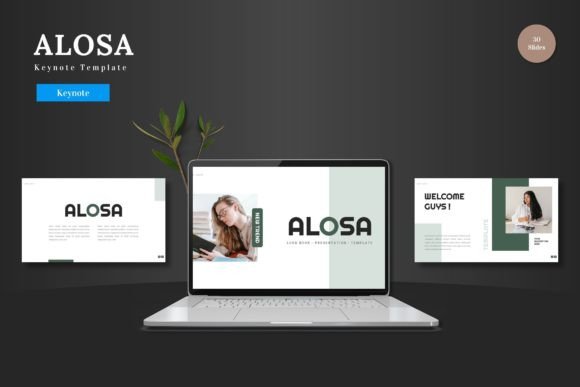
At its core, Alosa is a comprehensive presentation system built for Keynote, designed to eliminate the friction between your ideas and their visual execution. It’s not merely a collection of pretty slides; it’s a structured environment for building narratives. The template boasts over 150 total slides across five premade color schemes, offering a robust foundation for any topic. Each slide is crafted with pixel-perfect illustrations and is fully editable directly within Keynote, meaning you don't need to juggle multiple software programs. You can change colors, swap placeholder images with a simple drag-and-drop, and adjust every graphic element to fit your brand’s unique voice.
Beyond the Pitch Deck: Unleashing Multipurpose Potential
While the name suggests a focus on presentations, the utility of a resource like Alosa extends far beyond boardroom pitches. Its clean, scalable design makes it a versatile component in a broader brand identity toolkit. Consider these practical applications for designers, entrepreneurs, and content creators:
- Internal Communications & Training: Use the section break slides and structured layouts to create clear, engaging onboarding materials or training modules for new team members. The animated slide transitions can help maintain viewer focus during longer sessions.
- Client Reports & Proposals: Transform dry quarterly reports or project proposals into compelling visual stories. The handcrafted infographics are perfect for presenting data in an easily digestible format, enhancing professional presentation and clarity.
- Workshop & Webinar Materials: For educators and coaches, the template provides a ready-made framework for slide decks, participant handouts, and promotional graphics, ensuring visual consistency across all touchpoints.
- Social Media Content Series: Extract individual slides or elements to create a cohesive series of social media graphics. The consistent color schemes and design language help build brand recognition across platforms like Instagram or LinkedIn.
The Anatomy of Effective Visual Communication
What makes a template like this genuinely useful isn't just its aesthetic appeal, but how its design principles solve common communication challenges. The emphasis on readability is paramount. Clean layouts with ample white space ensure your content—not the design—remains the focal point. The inclusion of picture placeholders streamlines the process of customizing slides, which is a huge time-saver for busy professionals who need to produce high-quality work quickly.
Furthermore, the system is built on Master Slides. This is a critical feature for maintaining consistency. When you edit the master slide, those changes cascade throughout your entire presentation. This is invaluable for ensuring that every slide adheres to your brand’s typography, color palette, and logo placement, which is a cornerstone of strong visual consistency and a polished brand identity.
Integrating Alosa into Your Design Workflow
For those who work across multiple design assets, thinking about how a presentation template fits into your ecosystem is key. Alosa’s design can serve as a springboard for other projects. The color schemes can inform your website’s palette, the infographic styles can be adapted for print materials like brochures, and the overall visual tone can guide your packaging design or editorial layouts.
When using the template, consider these practical steps:
- Start with Strategy: Before diving into edits, outline your presentation’s goal. Are you informing, persuading, or inspiring? Let this guide your choice of slide layouts and the hierarchy of information.
- Customize with Purpose: Use the five color variations as a starting point, but don’t be afraid to modify them to match your exact brand colors. The goal is to make the template your own, not to be bound by its defaults.
- Leverage the Gallery: The included gallery and portfolio slides are perfect for showcasing past work, product lines, or team members. Use high-quality, consistent imagery to maximize impact.
- Test for Clarity: After building your deck, review it on different devices. Check for readability at various screen sizes and ensure that animations and transitions enhance, rather than distract from, your message.
Ultimately, a resource like the Alosa - Keynote Template is about empowerment. It provides a professional, scalable foundation that saves you time and elevates the perceived quality of your work. Whether you’re a small business owner crafting your first investor deck, a marketer developing a campaign toolkit, or a content creator designing educational content, having a reliable, well-structured visual system at your fingertips allows you to focus on what truly matters: your message and your audience. It’s a practical tool for anyone who understands that in the world of business and creativity, how you present your ideas is often as important as the ideas themselves.