Cerutas: Streamline Your Visual Storytelling
Creating a presentation that truly captures attention requires more than just assembling bullet points and stock photos; it demands a cohesive visual narrative. When you are pitching a new client, outlining a marketing strategy, or presenting quarterly results, the layout of your slides plays a critical role in how your message is received. The Cerutas - Google Slide Template is designed specifically to bridge the gap between professional aesthetics and functional utility, offering a comprehensive toolkit for anyone needing to communicate complex ideas with clarity and style. It moves beyond basic templates by providing a structured yet flexible environment that respects the time constraints of busy professionals while delivering high-end design results.
A Deep Dive into Visual Flexibility
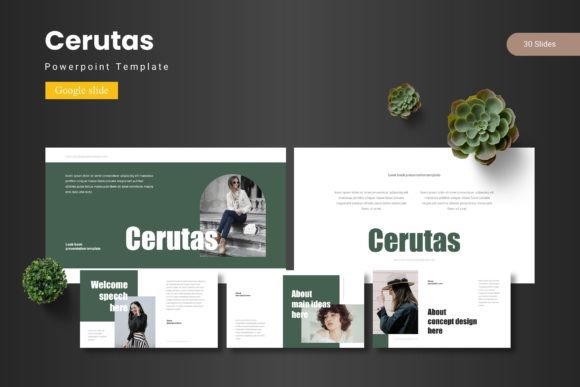
What sets this collection apart is the sheer volume of options available without overwhelming the user. With over 150 total slides distributed across five premade color schemes, the Cerutas - Google Slide Template provides a robust foundation for various visual needs. Each color variation consists of 30 distinct slides, allowing you to switch the entire mood of your presentation with a single click. This is particularly useful for brands that have strict color guidelines or for designers working on multiple projects simultaneously. The inclusion of section break slides helps in organizing content logically, ensuring that your audience can follow the progression of your narrative without getting lost in a sea of information.
For those who value precision, the template is built on Master Slides. This technical backbone ensures that any changes made to the master layout automatically propagate throughout the entire presentation, saving hours of manual editing. Whether you are adjusting fonts, resizing elements, or aligning objects, the pixel-perfect illustrations and graphics remain sharp and consistent. This level of detail is crucial for maintaining a professional image, as even minor misalignments can distract viewers and undermine the credibility of your content.
Practical Applications for Modern Professionals
The utility of the Cerutas - Google Slide Template extends far beyond standard boardroom presentations. Its versatile design makes it an asset for a wide range of creative and commercial applications. For small business owners and entrepreneurs, it serves as a powerful tool for creating compelling pitch decks that can attract investors or secure new partnerships. The drag-and-drop picture placeholders simplify the process of integrating product photography or team portraits, making it easy to personalize the content without needing advanced design skills.
Content creators and marketers will find the handcrafted infographics particularly valuable. In the age of data-driven storytelling, the ability to present statistics and workflows in a visually engaging manner is essential. These infographics can be resized and edited to fit specific datasets, helping to transform dry numbers into a narrative that resonates with the audience. Furthermore, the gallery and portfolio slides offer a clean, grid-based layout ideal for showcasing work samples, whether you are a photographer displaying your latest shoot or a graphic designer presenting a rebranding project.
Consider the needs of a freelance consultant preparing a workshop. The structured nature of the slides allows for a seamless flow of information, from the introduction of concepts to detailed case studies. Similarly, a non-profit organization could utilize the template to create a fundraising presentation that balances emotional storytelling with transparent financial data. The adaptability of the design ensures that it can handle both text-heavy content and image-centric layouts with equal ease.
Designing for Brand Consistency and Recognition
One of the most significant challenges in branding is maintaining consistency across all touchpoints. When your visual language fluctuates, it confuses your audience and dilutes your message. By utilizing a cohesive template like Cerutas, you establish a recognizable visual identity that reinforces your brand values every time you present. The five included color schemes are not just random palettes; they are curated to evoke specific tones, ranging from corporate and trustworthy to creative and energetic. Selecting the right scheme and sticking to it helps in building a visual memory for your clients and stakeholders.
Beyond just colors, the typography and layout choices contribute to a professional presentation that commands respect. A cluttered or poorly formatted slide deck can make even the most innovative idea look amateurish. Conversely, a clean, well-organized layout signals competence and attention to detail. This psychological impact is vital in competitive environments where first impressions are often the deciding factor. The template acts as a silent ambassador for your brand, communicating professionalism before you even speak a word.
Optimizing Workflow and Efficiency
Time is a non-renewable resource for designers and entrepreneurs alike. The architecture of the Cerutas - Google Slide Template is optimized for efficiency, allowing users to focus on the substance of their message rather than the mechanics of design. Because it is based on Google Slides, it facilitates real-time collaboration. Teams can work on the same presentation simultaneously, leave comments, and track changes without the hassle of emailing large files back and forth. This cloud-based approach is indispensable for remote teams and fast-paced projects.
The "Readme First" documentation included in the main file is a thoughtful addition that ensures a smooth setup process. It provides essential information regarding fonts and photos, helping you avoid common pitfalls like missing typefaces or licensing issues. This attention to user experience reflects a design philosophy that prioritizes the end-user's needs, making the transition from download to final presentation as frictionless as possible.
Maximizing Impact with Infographics and Visuals
Visual aids are the backbone of effective communication. The handcrafted infographics within the Cerutas - Google Slide Template are designed to do more than just decorate a page; they are tools for clarification. Complex processes, hierarchical structures, and chronological timelines can be difficult to explain with text alone. By leveraging these pre-designed visual elements, you can break down intricate topics into digestible chunks. For instance, a marketing agency can use a funnel graphic to explain the customer journey, while a tech startup can use a roadmap slide to outline their development timeline.
The ability to resize and edit all graphics ensures that these elements can be tailored to fit the specific context of your data. You are not locked into a rigid structure; rather, you are given a set of building blocks that can be rearranged to suit your unique narrative. This flexibility is particularly important when dealing with non-standard data sets or when trying to emphasize specific metrics that are most relevant to your audience.
Strategic Presentation for Different Audiences
Understanding your audience is the first step in effective communication, and your presentation style should reflect that understanding. The versatility of the Cerutas template allows it to be adapted for various demographics and professional settings. For a formal corporate environment, the minimalist color schemes and structured layouts convey authority and seriousness. For a creative workshop or a design pitch, the more vibrant color variations and dynamic layouts can help convey energy and innovation.
Think about the specific goals of your project. Are you trying to educate, persuade, or inspire? The layout of your slides should support these objectives. Educational presentations might benefit from more text-heavy slides with clear headings, while persuasive pitches might rely more heavily on high-impact visuals and testimonials. The diverse range of slide types available in this template ensures that you have the right tool for every phase of your presentation, from the initial hook to the final call to action.
Final Thoughts on Elevating Your Visual Strategy
In a digital landscape saturated with information, the ability to present your ideas clearly and beautifully is a competitive advantage. The Cerutas - Google Slide Template offers a practical, high-quality solution for anyone looking to elevate their visual communication. It combines aesthetic appeal with functional design, providing a platform that supports everything from data visualization to portfolio showcases. By investing in a robust template system, you are not just buying slides; you are streamlining your workflow, reinforcing your brand identity, and ensuring that your message is delivered with the impact it deserves. Whether you are a seasoned designer or a business owner taking control of your own marketing materials, this resource provides the foundation you need to succeed.