Creating Impactful Presentations with the Gugerof PowerPoint Template
Every entrepreneur knows the moment: you’re standing in front of a potential investor, a new client, or your team, and you need to convey a complex idea quickly. The screen lights up, and the first slide appears. In that split second, before you utter a word, the design either establishes your credibility or undermines it. A cluttered, default layout suggests a lack of preparation, while a clean, cohesive design signals professionalism. This is where the difference between a forgettable meeting and a successful pitch often lies. It’s not just about the data; it’s about how the data is presented, and having the right design assets is non-negotiable for modern communicators.
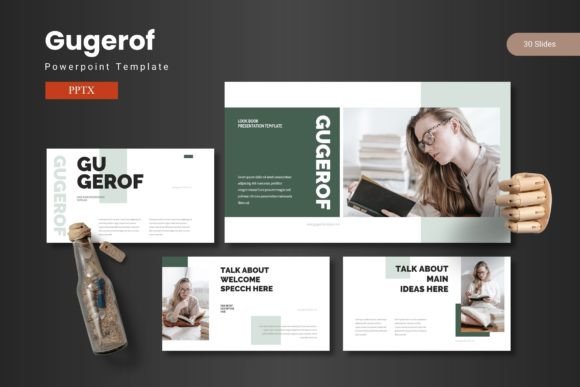
The Gugerof - Powerpoint Template is built for this exact scenario. It’s a comprehensive design toolkit that moves beyond basic slide creation. With over 150 total slides organized across five premade color schemes, it provides a structured yet flexible foundation for any narrative. The template isn't a single static file; it's a system of 30 unique slides for each color variation, including dedicated section break slides to guide your audience through the story. This structure is invaluable for small business owners building a brand deck or marketers outlining a campaign strategy. The handcrafted infographics and pixel-perfect illustrations are particularly useful. Instead of wasting hours searching for generic icons, you have a library of resizable, editable graphics at your fingertips. The drag-and-drop picture placeholder feature simplifies the process of adding your own images, ensuring everything stays aligned and professional without manual tweaking.
From Data to Story: Practical Applications
Think of this PowerPoint design template as a visual communication partner. Its utility extends far beyond a standard quarterly review. For a startup founder, the customizable layouts are perfect for crafting a compelling investor pitch. You can seamlessly blend financial charts, team bios, and product mockups into a single, flowing presentation. The gallery and portfolio slides are a game-changer for creative agencies and freelancers. Instead of sending a separate PDF portfolio, you can present your work in an interactive, high-impact format during a client meeting, walking them through your process and results in real-time.
Content creators and educators will find immense value in the template's ability to break down complex information. The handcrafted infographics allow you to transform statistics into engaging visual stories, making blog content or webinar material more digestible and shareable. For internal use, it’s equally powerful. A marketing manager can use the consistent design system to create branded training materials for new hires, ensuring the company’s visual identity is communicated clearly from day one. The five color variations also offer a simple way to differentiate between projects or departments while maintaining a unified brand feel across all company communications.
Achieving Visual Consistency and Brand Recognition
One of the most significant challenges in branding is consistency. Your presentation materials should feel like a natural extension of your website, social media graphics, and packaging. The Gugerof template facilitates this by providing a cohesive design language. When you use the same color scheme and design elements across your slides, you reinforce brand recognition. This isn’t just about aesthetics; it’s a strategic move. A consistent visual identity builds trust and makes your brand more memorable. The template’s structure, based on master slides, is key here. Any change you make to the master slide automatically updates throughout the entire presentation, saving you from the tedious task of editing each slide individually. This feature is a practical lifesaver for anyone managing multiple projects or clients.
Furthermore, the professional presentation this template enables directly impacts audience engagement. Clean layouts and well-organized information reduce cognitive load, allowing your viewers to focus on your message rather than deciphering a messy slide. The ample white space and clear hierarchy guide the eye naturally from one point to the next. This thoughtful design approach demonstrates respect for your audience’s time and attention, which can translate into more productive meetings and better outcomes. It’s about creating an experience where your ideas are the hero, and the design is the supportive, silent partner that makes them shine.
Practical Advice for Your Next Project
When you first open the Gugerof template folder, you’ll find the main PowerPoint files and a readme document. It’s a good practice to review the readme first, as it contains important information about the fonts and photos used. This ensures you can maintain the intended look or make informed substitutions if needed. While the template is designed for ease of use, taking a moment to plan your content will yield the best results. Before diving into slide design, outline your key messages and decide which visual format—chart, icon, image, or text—best supports each point.
Consider your audience. A pitch to venture capitalists will have a different tone and flow than a workshop for fellow hobbyists. Use the section break slides to create clear transitions and give your audience a moment to absorb information. Don’t feel compelled to use every single slide; select the layouts that serve your narrative best. The true power of a tool like this is its adaptability. It provides the professional polish and structural integrity that can be difficult to achieve from scratch, freeing you up to focus on what matters most: your message, your story, and your connection with the audience. Whether you’re presenting a new product, a marketing plan, or a creative portfolio, having a robust design system like this at your disposal builds confidence and ensures your ideas are shared with the visual impact they deserve.