Master Your Next Presentation with the Rumeta Template
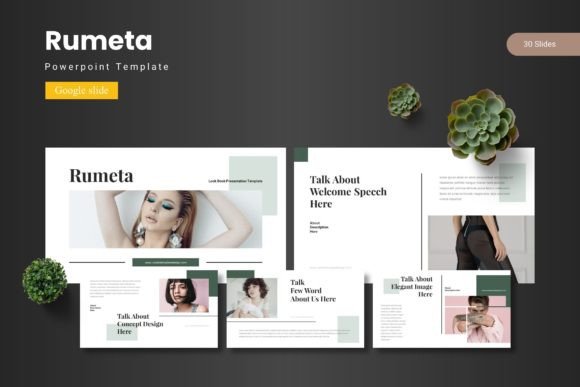
Every entrepreneur, freelancer, and creative professional knows the struggle of staring at a blank slide deck. You have the data, the strategy, and the vision, but translating that into a polished visual narrative can eat up hours you simply don't have. This is where the Rumeta - Google Slide Template steps in, offering a robust solution for anyone needing to deliver high-impact presentations without starting from scratch. It’s more than just a collection of slides; it’s a comprehensive design system built for speed, flexibility, and professional polish. Whether you are pitching to investors, teaching a workshop, or presenting a quarterly report, the structure of your slides dictates how your audience receives your message.
Why Structure Matters in Visual Communication
Good design is often invisible. When a presentation flows well, the audience focuses on the content, not the layout. However, when slides are cluttered, inconsistent, or visually chaotic, it creates cognitive friction. The Rumeta - Google Slide Template addresses this by providing a framework that prioritizes clarity and flow. With over 150 total slides spread across five distinct color variations, it offers a massive library of layouts designed to handle any type of content. You aren't just getting a static background; you are getting handcrafted infographics, section breaks, and master slide layouts that ensure every pixel is in the right place.
For small business owners and marketers, visual consistency is the bedrock of brand identity. Using a cohesive design asset like Rumeta ensures that your internal team meetings look just as professional as your external client pitches. The template is built on Master Slides, which means you can make global changes to fonts, colors, and logos in seconds, rather than manually editing every single page. This feature alone is a lifesaver when you are working against a deadline.
From Concept to Deck: Practical Applications
The versatility of the Rumeta template makes it a valuable tool across various creative industries. It isn't limited to corporate boardrooms. Here is how different professionals can leverage this asset:
- Content Creators and Bloggers: If you are repurposing blog content into a slide deck for SlideShare or LinkedIn, the gallery and portfolio slides are perfect for showcasing high-resolution imagery. You can use the picture placeholder feature to drag and drop your photos directly into complex shapes without worrying about cropping ratios.
- Marketing Professionals: Creating marketing assets often involves presenting data. The pixel-perfect illustrations and infographics included in Rumeta allow you to visualize complex statistics in a way that is engaging and easy to digest. Instead of generic clip art, you get modern, editable vector graphics that elevate your storytelling.
- Entrepreneurs and Startups: When pitching your business, the color scheme sets the mood. Rumeta includes five pre-made color palettes. If you are a tech startup, you might choose a cool blue and grey scheme. If you are a lifestyle brand, perhaps the warmer tones work better. This flexibility allows you to match the template to your existing brand identity effortlessly.
Furthermore, the template serves as an excellent foundation for editorial design. If you are compiling a digital magazine or a lookbook, the layout options allow for creative typography and image placement that rival professional print design. The ability to resize and edit all graphics means you can adapt the visual language to fit packaging design presentations or social media graphics strategies without needing advanced software like Adobe InDesign.
Design Flexibility and Customization
One of the standout features of the Rumeta - Google Slide Template is its adaptability. Google Slides has often been viewed as the "lighter" alternative to PowerPoint, but with the right template, it becomes a powerhouse. The Rumeta deck includes 30 unique slides for each of the five templates, giving you a total of 150 options.
Think about the time saved by having a pre-built timeline slide, a team introduction layout, or a pricing table ready to go. You simply need to replace the placeholder text with your own content. The handcrafted infographic elements are particularly useful for explaining processes. Instead of writing a dense paragraph about your company's workflow, you can use a visual step-by-step diagram included in the template. This improves readability and keeps your audience engaged.
The design style is modern and clean, leaning towards a sans serif font aesthetic that aligns with current modern typography trends. This ensures your presentation looks current, not dated. However, because the template is fully editable, you have the freedom to swap fonts. If your brand uses a specific serif font for headings or a script font for accents, you can easily integrate them. The instructions in the "Readme First" file make it simple to install the recommended fonts if you wish to keep the original look.
Maximizing Impact with Minimal Effort
Efficiency is key in the business world. The drag-and-drop picture placeholder functionality is a critical feature for speed. You don't need to be a design wizard to make your images fit perfectly into circles, hexagons, or complex grids. This democratizes design, allowing hobbyists and crafters to create professional-looking presentations for community groups or workshops.
For those involved in web design or UI/UX, the Rumeta deck can even serve as a style guide presentation. You can use the slides to present color swatches, typography choices, and UI components to clients in a structured format. The clean lines and pixel-perfect nature of the graphics ensure that your design specifications are communicated clearly.
Consider also the aspect of commercial licensing. When using assets for business purposes, it is vital to ensure you have the rights to the graphics and fonts included. The Rumeta package comes with editable elements, allowing you to use them in commercial projects, provided you adhere to the specific licensing terms detailed in the readme file. This peace of mind is invaluable for freelancers creating assets for clients.
Building a Cohesive Brand Narrative
Ultimately, a presentation is a narrative tool. The Rumeta template helps you structure that narrative visually. By utilizing the section break slides, you can clearly demarcate different chapters of your story—moving from the "Problem" to the "Solution," and finally to the "Call to Action." This logical flow guides your audience through your argument.
The five color variations are not just random palettes; they are curated to evoke different emotions. Choosing the right palette can subconsciously influence how your audience perceives your brand. A bold, high-contrast scheme might suggest innovation and disruption, while a softer, pastel scheme could imply approachability and creativity. This is a subtle but powerful aspect of visual communication.
Whether you are designing a deck for a local business meetup or a global webinar, the tools you use reflect your professionalism. The Rumeta - Google Slide Template provides the scaffolding for you to build something impressive. It removes the technical barriers of design, allowing you to focus on what matters most: your message. By combining these robust design assets with your unique content, you can transform a standard meeting into a memorable visual experience.