Mocatos: A Keynote Template for Effortless Professional Presentations
Imagine this: you have a crucial investor pitch tomorrow, a product launch webinar next week, or a quarterly review that needs to impress leadership. The content is solid, the data is compelling, but the thought of building a presentation from scratch feels daunting. Hours spent aligning boxes, choosing colors, and wrestling with animations that never look quite right. This is where a tool like the Mocatos Keynote Template shifts from a nice-to-have to a genuine productivity powerhouse. It’s not just about having pretty slides; it’s about reclaiming time and mental energy to focus on what you’re actually saying.
Beyond the Aesthetics: The Practical Engine for Modern Business
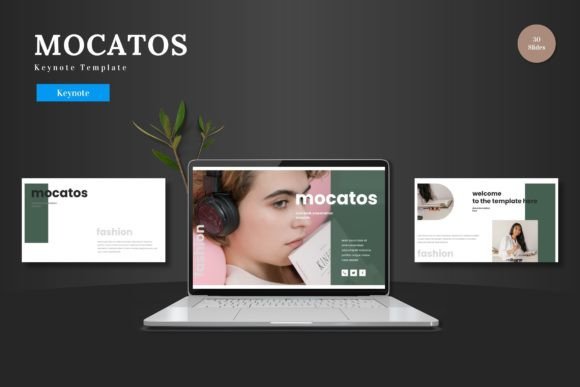
At its core, Mocatos is a meticulously organized system for Keynote Slides. With over 150 total slides across five premade color schemes, it offers a vast library of layouts tailored for real-world business communication. Think of it as a visual language toolkit. The "Clean, scalable, colorful and multipurpose" description is accurate, but the true value lies in how this translates to daily use. For a small business owner, this means having a ready-made structure for a product promotion that looks cohesive and polished. For a marketer, it’s the ability to quickly assemble a data-driven report with handcrafted infographics that make complex information digestible. The template is built on master slides, which is a technical detail with a very practical benefit: make a change to the master, and it cascades throughout your entire presentation, ensuring absolute visual consistency from the first slide to the last.
Streamlining Your Brand's Visual Storytelling
Visual consistency is the bedrock of brand recognition. When your pitch deck, internal training materials, and social media webinars all share a common design DNA, you build a subconscious sense of reliability and professionalism. Mocatos facilitates this effortlessly. The five color variations allow you to select a scheme that aligns with your brand guidelines from the outset. The pixel-perfect illustrations and resizable graphics aren't just decorative; they are communication tools. A well-designed timeline slide can map your company's history, a comparison chart can elegantly showcase your product's advantages, and a portfolio slide can display your work with gallery-like precision. This moves your presentation from a series of bullet points to a compelling visual narrative.
From Digital Slides to Tangible Brand Assets
The utility of a robust template like this extends far beyond the keynote stage. Consider the cohesive visual assets you can derive from it. The clean typography and balanced layouts can inspire your website's hero section or blog post graphics. The infographic styles can be adapted for printed brochures or detailed PDF reports sent to clients. The color palettes and design motifs can seed ideas for packaging design or social media templates, ensuring your Instagram Stories and LinkedIn posts feel like part of the same brand family as your main presentations. In this way, Mocatos acts less as a single-file solution and more as a foundational design asset, a starting point that sparks consistent creativity across multiple marketing and communication channels.
Unlocking Efficiency: The Editable Framework
A common frustration with design templates is the locked, opaque nature of the files. Mocatos sidesteps this by emphasizing that all elements are editable directly within Keynote Slides. There's no need for additional software. This is a game-changer for agility. The picture placeholders with drag-and-drop functionality mean swapping out a stock photo for your own team photo or product image takes seconds, not minutes. Changing the color scheme to match a seasonal campaign or a new brand direction is a centralized task. This level of control empowers you to maintain the template's professional quality while making it uniquely yours. The included "Readme First" file with font and photo information is a thoughtful touch, providing clear guidance on the design resources used, which is crucial for maintaining consistency if you need to source similar assets later.
Choosing the Right Visual Framework for Your Goal
Not every presentation serves the same purpose, and a good template should adapt to that reality. A startup founder crafting a seed-round pitch deck needs slides that build a narrative arc—problem, solution, market, traction, team. Mocatos's section break slides are perfect for creating those dramatic pauses and chapter markers in your story. A teacher creating an educational module might prioritize clear data visualization and step-by-step process slides. The template’s multipurpose nature means you’re not shoehorning your content into a one-size-fits-all box; you’re selecting from a curated set of tools designed for different communication tasks. The key is to start with your objective: Are you informing, persuading, or inspiring? Then, choose the slides that serve that goal most effectively, rather than feeling obligated to use every available option.
Ultimately, the measure of a great presentation tool is how seamlessly it gets out of the way, allowing your ideas to take center stage. It should reduce friction, not add complexity. By providing a clean, professional, and highly customizable foundation, a template like Mocatos enables you to present your work with the clarity and confidence it deserves. It turns the daunting task of "making slides" into the strategic act of crafting a visual argument, giving you back the hours to refine your message and connect with your audience. That’s the real return on investment—not just a beautiful deck, but the time and headspace to make your business thrive.