Suleva: A Keynote Template That Actually Saves Your Sanity
You know that feeling when you open a blank presentation file and just… stare? The cursor blinks. The white space feels endless. You have a brilliant idea, a product launch, a pitch to nail, but the thought of wrestling with text boxes, aligning shapes, and hunting for a color palette that doesn’t look like it came from 2005 is enough to make you close the laptop. I get it. As someone who’s built decks for everything from investor meetings to local craft fair promotions, the design phase can be the biggest hurdle. This is exactly where a solid, well-built template becomes less of a shortcut and more of a strategic partner.
More Than Just Pretty Slides: The Engine Under the Hood
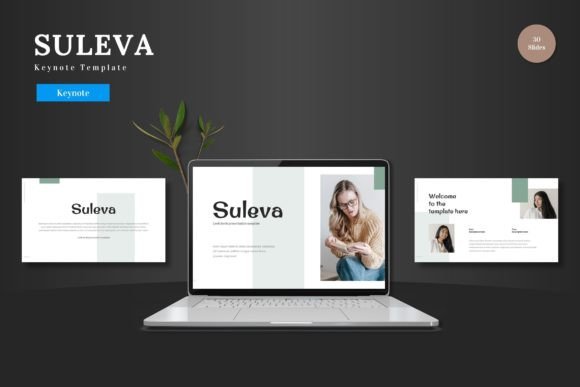
So, what is the Suleva - Keynote Template? At first glance, it’s a collection of 150+ slides across five pre-made color themes. But looking closer, you realize it’s a system. Each of the five color variations gives you 30 meticulously crafted slides, plus dedicated section breaks to structure your narrative. The "engine" is its foundation on Master Slides. This isn't just jargon; it means you can change a font, adjust a color, or tweak a layout once on the master, and it cascades through your entire presentation. For a small business owner juggling ten tasks, this consistency is gold. You maintain brand integrity without manually editing 150 individual elements.
The practicality goes deeper. Every graphic, icon, and infographic is pixel-perfect and fully editable. You’re not stuck with a static chart that doesn’t match your data. Need to resize that bar graph to fit your quarterly sales figures? Go ahead. The elements are vector-based, so they scale without getting blurry. Then there’s the drag-and-drop picture placeholder feature. Instead of the usual "delete this box and insert your image," you literally drag your photo onto a designated area, and it crops to fit perfectly. It removes that fiddly, frustrating step that breaks your creative flow. This template is designed for people who have something to say and need a clear, professional vessel to say it in.
From Pitch Decks to Product Catalogs: Real-World Applications
Let’s move beyond the abstract. Where does Suleva truly shine? Its clean, multipurpose design is its greatest strength. Think of it as a high-quality, neutral canvas.
- For the Entrepreneur: Your pitch deck is your first impression. Use the structured slides to walk investors through your problem, solution, market size, and financials. The animated transitions (included, by the way) can add subtle professionalism without being distracting.
- For the E-commerce Owner: Creating a product launch presentation for your team or a visual catalog for wholesale buyers? The gallery and portfolio slides are purpose-built for this. Showcase high-resolution images of your new line, highlight key features with the handcrafted infographics, and present a cohesive brand story.
- For the Marketer or Content Creator: Planning a social media campaign or a webinar? Use the template to storyboard your content. Lay out your key messages, plan your visual assets for Instagram or LinkedIn, and create a shareable PDF guide for your audience. The scalability of the graphics means your exported images will look crisp on any platform.
- For the Local Business or Blogger: Need to present a new service menu, a workshop outline, or a blog content strategy? The sections help you organize information logically. The color variations allow you to pick a scheme that resonates with your existing brand identity, ensuring everything you put out feels connected.
The core value here is visual consistency. Whether you're designing a deck, a one-pager, or a social media graphic, using the same template system ensures your colors, fonts, and spatial relationships remain uniform. This builds brand recognition faster than almost any other tactic. Your audience starts to associate that specific shade of blue or that clean layout style with you.
Making It Your Own: Practical Tips for Customization
Getting a template is one thing; making it authentically yours is another. Here’s how to approach it practically.
Start with Color Psychology. Don’t just pick the prettiest color scheme. Think about your industry and message. A finance consultant might gravitate towards the deep blues and greens for trust and growth. A boutique bakery could use the warmer, earthy tones. The five included schemes give you a fantastic starting point, but don’t be afraid to use the master slides to input your exact brand hex codes.
Font Pairing is Your Secret Weapon. The template uses clean, modern typography, but you should pair it with fonts from your own brand kit. A good rule of thumb: use one font for headings (a bold sans-serif or a distinctive serif) and a highly readable font for body text. If you don’t have a brand kit, this is a great opportunity to establish one. Look for a premium font that reflects your personality—maybe a strong display font for impact and a classic sans serif font for clarity.
Content is King, but Clarity is Queen. Use the slides to force brevity. The bullet points and icon-driven layouts are there to help you distill your message. Instead of cramming a paragraph onto a slide, use the infographic elements to visualize a process or a statistic. Your audience will thank you for respecting their time and attention.
Test Before You Present. Always run your slideshow in Presenter View. Check the animations—do they aid the story or distract? View the slides from the back of the room (or on a small phone screen if it’s for digital). Is the text readable? Are the images compelling? The readability of your content is non-negotiable.
A Final Thought on Tools and Professionalism
In a world saturated with content, the quality of your presentation is a direct reflection of the quality of your idea. A messy, inconsistent, or amateurish deck can undermine even the most brilliant concept. The Suleva - Keynote Template isn’t about doing the work for you. It’s about removing the technical barriers so your expertise, your product, and your story can take center stage. It’s about presenting your ideas to the world with the clarity and polish they deserve. So, go ahead, input your content, replace the images, and make it yours. Cheers to your next great presentation.