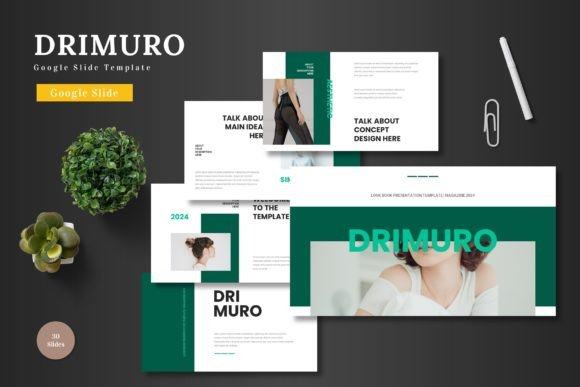
Drimuro: The Google Slides Template That Streamlines Your Presentations
Creating a polished, professional presentation often feels like a battle against time and technical limitations. You have the ideas, the data, and the story to tell, but wrestling with formatting, alignment, and design consistency can drain your energy before you even begin to present. This is where a thoughtfully designed asset like Drimuro - Google Slide Template enters the picture, offering a structured yet flexible foundation that lets you focus on your message rather than the mechanics of slide design.
Drimuro isn't just a collection of slides; it's a comprehensive design system built directly within Google Slides. The philosophy here is practical: provide a clean, scalable, and multipurpose canvas that adapts to a wide range of professional needs. Whether you're a startup founder crafting a pivotal pitch deck, a marketer outlining a new campaign, or a teacher preparing engaging course material, the template is engineered to save you hours of design work while elevating the visual quality of your output.
A Foundation Built for Clarity and Customization
The core appeal of Drimuro lies in its commitment to visual clarity and ease of use. Every element is designed with pixel-perfect precision, ensuring your presentation looks sharp and professional on any screen. The template is built on master slides, which is a crucial feature for maintaining consistency. By editing the master, you can make global changes to fonts, colors, and logos across all 150+ slides in an instant, guaranteeing your brand identity remains intact throughout your entire presentation.
Customization is where Drimuro truly shines for the busy professional. The template includes five premade color schemes, allowing you to quickly switch the entire mood of your presentation to match your brand palette or the specific context of your talk. All graphics and illustrations are fully resizable and editable vectors, so you can scale them without losing quality. The drag-and-drop picture placeholders are a game-changer for efficiency—simply click, choose your image from your drive, and it automatically fits the designed frame. This intuitive system means you can assemble a stunning, data-rich presentation in a fraction of the time it would take starting from scratch.
From Pitch Decks to Portfolios: Real-World Applications
The versatility of this template makes it a valuable asset across numerous professional scenarios. For entrepreneurs and business owners, it’s an ideal tool for creating compelling pitch decks and investor presentations. The structured slides for timelines, team introductions, financial data, and product features help you tell a logical and persuasive story. The section break slides provide clear visual pauses, guiding your audience through the narrative of your business plan or quarterly review.
Marketers and content creators will find immense value in using Drimuro for campaign planning and social media strategy presentations. You can easily map out content calendars, present market research findings, or showcase mockups for digital ads. The gallery and portfolio slides are perfect for visual industries—designers, photographers, and agencies can display their work in a clean, organized format that impresses potential clients. Furthermore, the template’s clean aesthetic makes it suitable for creating internal training materials, project proposals, or even visual reports that need to communicate complex information with simplicity.
Integrating Drimuro into Your Branding Workflow
Consistent visual communication is a cornerstone of strong branding. Drimuro supports this by providing a cohesive framework for all your presentation needs. When you use the same template for client pitches, internal meetings, and webinar slides, you reinforce your brand’s professional image. The ability to customize colors and use your own imagery means the template adapts to your brand guidelines, not the other way around.
Think of this Google Slides template as a key part of your broader design assets. While you might use specific fonts for your logo and website, Drimuro ensures your spoken and presented materials share the same visual DNA. This alignment between your printed or digital materials and your live presentations builds recognition and trust with your audience. It signals attention to detail and a commitment to quality, which can significantly impact how your message is received—whether you're closing a sale, educating a group, or inspiring a team.
Practical Tips for Getting the Most Out of Your Template
To leverage Drimuro effectively, start by setting up your master slides with your core brand elements: your logo, primary and secondary brand colors, and preferred fonts. This one-time setup will save you countless hours on every future presentation. When replacing placeholder images, use high-resolution visuals that are relevant and professional; the template’s clean design will make them stand out even more.
Don’t feel confined to the premade color schemes. Use them as a starting point, but don’t hesitate to apply your own brand’s color codes for a truly customized feel. Take advantage of the infographic elements to visualize data, as they are designed to be both informative and aesthetically pleasing. Finally, remember that the animated slides can add a dynamic touch to your delivery, but use them sparingly and purposefully to emphasize key points rather than distract from your content.
In the end, a tool like Drimuro - Google Slide Template is about removing friction from the creative process. It provides the professional scaffolding so you can pour your energy into what truly matters: crafting a clear, compelling, and memorable message for your audience. With its extensive slide library, intuitive editing features, and versatile design, it’s a practical solution for anyone who needs to communicate ideas with visual impact and efficiency.