Emalosa: Your All-in-One Google Slides Template for Stunning Presentations
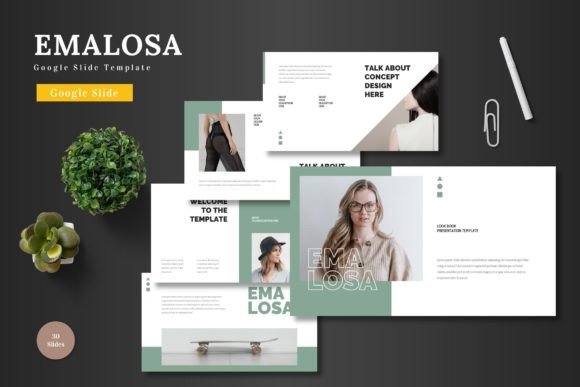
Imagine this: you've got a brilliant idea for your startup, a crucial client pitch, or a new product launch. The content is solid, the strategy is sound, but the presentation? It needs to look just as polished and professional as the concept behind it. This is where the gap often lies between a good idea and a great impression. A visually disjointed, generic slide deck can undermine even the most compelling message. That's precisely the challenge the Emalosa - Google Slide Template is built to solve. It’s not just a collection of slides; it’s a comprehensive design system crafted for Google Slides, designed to help entrepreneurs, marketers, and creators present their ideas with clarity, consistency, and undeniable visual appeal.
Beyond the Basics: What Makes a Presentation Template Truly Effective?
Many templates offer a handful of pretty slides, but they often lack the foundational structure needed for real-world use. A truly effective template acts as a framework. Emalosa understands this, providing a robust base built on master slides. This means every element, from the layout of your title page to the structure of your data charts, is interconnected and easily modifiable. You’re not just changing colors on individual slides; you’re maintaining a cohesive visual language throughout your entire deck. This approach is crucial for brand identity. When your presentation uses consistent typography, color schemes, and graphic styles, it reinforces your brand's professionalism and makes your message more memorable. For a small business owner, this consistency can be the difference between looking like a side project and being perceived as a serious contender.
A Practical Toolkit for Modern Visual Communication
Let’s talk about the nuts and bolts. The strength of Emalosa lies in its versatility and the practical tools it hands you. With over 150 total slides across five premade color schemes, you have a vast library to draw from. Need a quick pitch deck? There’s a set for that. Planning a detailed product promotion or an e-commerce overview? The slides are ready. This isn't about overwhelming you with choices, but about providing the right slide for the right moment.
Consider the infographic and illustration elements. These aren't just decorative; they are powerful tools for visual communication. A well-designed chart can explain a complex process in seconds, and a custom illustration can make an abstract concept tangible. Because every graphic is resizable and editable, you can tailor them to fit your specific data and narrative, ensuring they serve your story, not the other way around. The picture placeholder feature is another silent hero. Simply drag and drop your images into pre-defined frames, and the template automatically resizes and crops them to fit perfectly. This eliminates the tedious, time-consuming work of manually adjusting every photo, letting you focus on your content.
From Branding to Business Growth: Real-World Applications
The true test of any design asset is how it performs in the field. How can Emalosa serve different professionals? For a content creator or blogger, the template can be transformed into a stunning media kit to attract brand partnerships. Use the portfolio and gallery slides to showcase your best work, and the clean layouts to present your audience demographics and engagement metrics professionally.
A marketing professional can leverage the structured slides for quarterly business reviews or campaign post-mortems. The section break slides help organize complex information into digestible chapters, making it easier for stakeholders to follow along. For small business owners, the applications are endless: create a compelling investor pitch, design a training deck for new hires, or develop a visually engaging sales proposal that stands out in a crowded inbox.
Even for hobbyists and crafters, the template offers value. Planning a community workshop? Use Emalosa to create a beautiful and informative presentation for participants. Organizing a local event? The slides can help you communicate schedules, highlights, and information to sponsors and attendees in a visually appealing way. The key is that the template provides a professional starting point, allowing you to inject your own personality and content without needing a degree in graphic design.
Making It Your Own: The Simplicity of Customization
One of the most significant barriers to using templates is the fear of complexity. You download a file, and suddenly you need specialized software or advanced skills to make basic changes. Emalosa eliminates this hurdle entirely. The entire template is edited directly within Google Slides. This is a game-changer for accessibility and collaboration.
Changing the entire color scheme is as simple as selecting a new theme from the five provided. Want to swap out a font? The Readme file clearly lists all used fonts, making it easy to maintain consistency or make deliberate pairing choices. This user-friendly approach empowers you to take full control. You can input your content, replace images, adjust colors, and even animate slides—all within the familiar, free environment of Google Slides. This means your team can collaborate in real-time on the presentation, leaving comments and making edits seamlessly, which is invaluable for fast-paced projects.
Building a Cohesive Visual Narrative
Ultimately, the goal of any presentation is to communicate a story effectively. A disjointed visual style can distract from that story. By using a comprehensive system like Emalosa, you ensure that every visual element supports your narrative. The consistent use of modern typography and clean design creates a professional backdrop that lets your ideas shine. The carefully considered slide layouts guide the viewer’s eye, emphasizing key points and data without clutter.
Think of it as building a brand experience within your presentation. Just as you would ensure your website, social media graphics, and packaging share a common visual thread, your internal and external presentations should do the same. This level of visual consistency builds trust and reinforces your brand recognition at every touchpoint. Whether you're presenting to a room of investors, a team of colleagues, or an audience at a conference, the polished, cohesive look of a well-designed deck speaks volumes about your attention to detail and professionalism before you even say a word.
The next time you sit down to prepare a presentation, consider the foundation you're building on. Starting with a versatile, well-structured, and easy-to-customize template like Emalosa - Google Slide Template can save you hours of design work and elevate the impact of your message. It provides the tools to create a presentation that is not only informative but also visually engaging and strategically aligned with your goals. It’s about working smarter, ensuring that the visual component of your communication is as strong and clear as the ideas it’s meant to convey.