Luminaro: Crafting Polished, Professional Presentations
You’ve spent weeks refining your business strategy, perfecting your product, or mapping out a creative vision. The last thing you want is for your big presentation to fall flat because the slides look cluttered, outdated, or inconsistent. We’ve all sat through presentations where the core message gets lost behind poor design choices—text that’s too small, colors that clash, or layouts that feel chaotic. The tool you use to share your ideas matters just as much as the ideas themselves. This is where a thoughtful, well-structured template becomes an invaluable partner, not just a decorative backdrop.
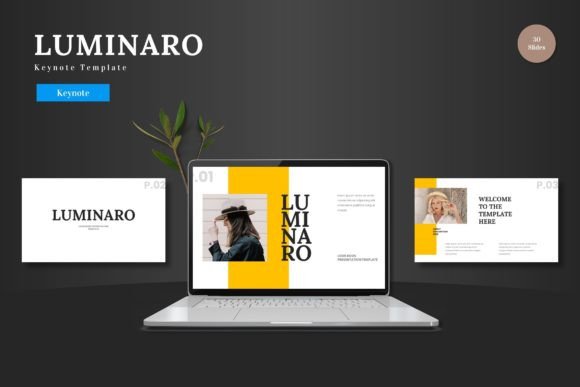
Luminaro - Keynote Template is built for those moments when you need to communicate with clarity and impact. It’s a collection of over 150 slides designed with a clean, scalable, and colorful aesthetic that adapts to a wide range of professional contexts. Whether you’re pitching a new venture to investors, outlining a marketing plan for your team, or showcasing a portfolio of creative work, this template provides a foundation that feels both modern and versatile. The design prioritizes visual breathing room, ensuring your content remains the focal point.
A Framework for Visual Consistency
One of the biggest challenges in presentation design is maintaining a cohesive look from the first slide to the last. Luminaro solves this by being built on master slides. This means every layout, color scheme, and font style is controlled from a central point, ensuring uniformity. You’re not just getting a set of disjointed pages; you’re getting a harmonious system. The five pre-made color variations offer distinct personalities—from bold and energetic to subdued and professional—allowing you to select a palette that resonates with your brand identity from the outset.
This consistency extends to the editable elements. Every shape, chart, and infographic is crafted as a native Keynote element. There’s no need to switch between different software to make adjustments. This seamless integration is a practical advantage for busy professionals. You can directly edit a chart’s data, change the color of an icon to match your brand’s hex code, or swap a placeholder image with a simple drag-and-drop. The result is a polished presentation that looks custom-designed, even if you’re not a graphic designer.
Practical Applications Across Industries
The true test of a design asset is its flexibility. Luminaro’s clean lines and structured layouts make it suitable for a surprising variety of projects beyond the standard boardroom pitch. Consider how a well-designed slide template can elevate other aspects of your work:
- For Entrepreneurs and Startups: Use the pitch deck slides to tell a compelling story about your business model, market opportunity, and team. The clear hierarchy helps guide investors through complex information without overwhelming them.
- For Marketing and Sales Teams: Create quarterly business reviews, campaign post-mortems, or product launch plans that are easy to follow and visually engaging. The infographic slides are perfect for illustrating data and results.
- For Educators and Trainers: Develop workshop materials or online course content. The scalable graphics ensure your visuals remain crisp, whether projected on a large screen or viewed on a laptop. The gallery and portfolio slides are ideal for showcasing student work or case studies.
- For Creative Professionals: Present design concepts, photography projects, or interior design plans. The minimal aesthetic allows your creative work to shine without competing with the template’s design elements.
The template’s multipurpose nature means it can be a recurring asset in your toolkit, adapting to different projects and clients over time.
Beyond the Slides: Integrating with Your Workflow
A presentation rarely exists in a vacuum. It’s often part of a larger brand ecosystem that includes websites, social media, and printed materials. The design principles embedded in Luminaro—clean typography, balanced composition, and strategic use of color—can inform these other areas. For instance, the color palette you choose for your presentation can easily translate to your social media graphics or website accents, reinforcing brand recognition.
When selecting a template like this, think about how its visual language aligns with your existing brand assets. Does the sans-serif font pairing feel modern and approachable enough for your audience? Does the level of visual detail complement your logo and other marketing materials? A good template should feel like a natural extension of your brand, not a foreign element.
Remember to review the included font styles and licensing. Ensure the fonts used are available for commercial use if you plan to present to clients or use the slides in digital products. Testing the template with your own content—your text, your images, your data—is a crucial step. This hands-on trial reveals how well the structure serves your specific narrative and helps you identify which layouts work best for different types of information.
Ultimately, a tool like Luminaro - Keynote Template is about removing friction from the design process. It allows you to focus on crafting a clear, persuasive message, confident that the visual delivery will be professional and cohesive. By providing a scalable, editable, and thoughtfully designed foundation, it helps bridge the gap between a great idea and a great presentation.