Mastering Visual Consistency with Your Social Media Web Banner Design Template
Creating a cohesive brand presence across the digital landscape often feels like trying to hit a moving target. You have Instagram stories, Facebook covers, LinkedIn banners, and Twitter headers, each demanding slightly different dimensions and creative approaches. For designers, entrepreneurs, and content creators, the struggle to maintain visual consistency while adhering to platform-specific requirements is a daily reality. This is where having a robust asset library becomes not just a luxury, but a strategic necessity. One of the most versatile tools in that library is a high-quality design template that serves as a foundation for your visual communication.
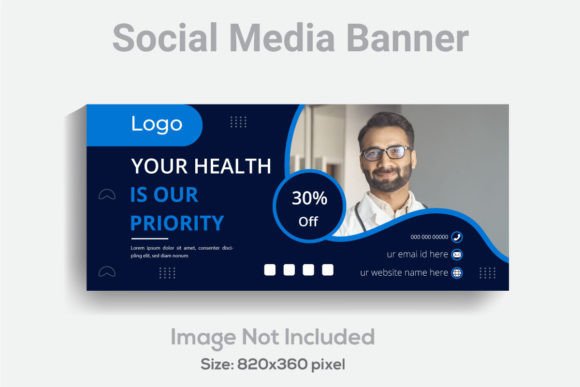
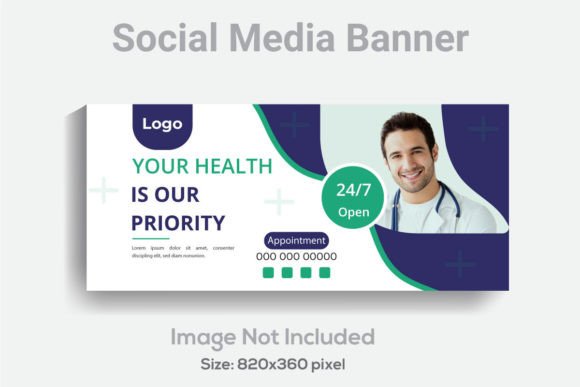
When you are managing a brand, whether it is your own personal brand or a client's, the "banner" is prime real estate. It is often the first thing a visitor sees when they land on a profile. A cluttered, pixelated, or poorly composed banner can instantly undermine credibility. Conversely, a sharp, professional, and well-layered design establishes authority. We are looking at a specific type of asset today: a versatile design template built for the modern web, specifically sized at 820x360 pixels. This dimension is particularly useful for high-impact areas like Facebook group covers or specific web headers, offering a wide panoramic aspect ratio that allows for creative storytelling.
The Anatomy of a Professional Asset: Why Specifications Matter
It is easy to dismiss technical specifications as boring details, but in the world of digital design, they are the difference between amateur hour and professional polish. Let’s break down why the features of this specific Social Media Web Banner Design Template matter to your workflow. First, the resolution is set at 300 DPI. While 72 DPI is standard for basic web display, 300 DPI provides a safety net. It ensures that if you decide to repurpose your design for print materials—perhaps for a flyer, a brochure, or event signage—the quality remains crisp and pixel-perfect. You are not limiting yourself to the screen; you are future-proofing your asset.
Furthermore, the color mode is RGB. This is the standard for digital screens, ensuring that the colors you see on your monitor are vibrant and accurate when uploaded to social platforms. But the real power lies in the file structure. The template comes as a fully layered Adobe Illustrator (AI) file. For anyone using Adobe Illustrator CS6 or above, this is a game-changer. "Well layered" and "organized" are not just buzzwords; they mean you can dive into the file and isolate every single element. Need to move that background texture? It’s on its own layer. Want to swap out a photo? The clipping mask is ready and waiting.
Unlocking Creative Control: Editable Elements
One of the biggest frustrations with generic templates is the "locked" nature of the design. You find a layout you love, but the text won't change, or the colors are flattened into a single image. This template solves that by offering full editability on text, fonts, and colors. This feature is critical for brand identity work. If you are a small business owner, you likely have a specific hex code for your brand colors and a primary typeface that defines your voice. Being able to plug those directly into a pre-designed layout saves hours of work.
Consider the typography aspect. The template utilizes free fonts, which removes the barrier of additional licensing costs or the hassle of tracking down paid typefaces for a client project. Typography is the voice of your design. By having full control over the text, you can shift the tone from professional and corporate to playful and whimsical in seconds. Whether you need a bold sans-serif for a tech startup or a flowing script for a wedding invitation service, the adaptability of the file allows the design to mold to your message, not the other way around.
Practical Applications: Beyond the Social Feed
While the name suggests a social media focus, the utility of a well-crafted 820x360 template extends far beyond a Facebook cover photo. Think about the header of your weekly newsletter. A consistent visual header reinforces brand recognition every time an email lands in a subscriber's inbox. For bloggers, this size works beautifully as a "hero image" or a featured content header within a post, breaking up text and adding visual interest.
For those involved in digital products, this template can be adapted to create mockups or promotional graphics for courses and e-books. Imagine you are launching a new online workshop. You need a banner for your sales page, a graphic for your "Thank You" confirmation page, and a promotional image for Twitter. By using this single template, you ensure that the visual language is identical across all touchpoints. This consistency builds trust. When a customer sees the same visual style on a social ad as they do on the landing page, the transition feels seamless and professional.
Streamlining Your Design Workflow
Efficiency is the currency of the creative professional. If you are a freelance designer juggling multiple clients, or a marketing manager responsible for daily content, you cannot afford to start from a blank canvas every time. Having a library of organized assets allows you to focus on strategy rather than pixel-pushing. Because the file includes an EPS version alongside the AI file, you have flexibility in the software you choose to use, though Illustrator remains the gold standard for vector manipulation.
The "well layered" aspect cannot be overstated when it comes to workflow speed. In a complex design, hunting for a specific element within a flat file is a nightmare. An organized file structure acts like a well-labeled filing cabinet. You can toggle visibility on and off to compare color options, lock background layers to prevent accidental shifts, and group related elements for easy scaling. This level of organization is what separates a chaotic design process from a streamlined production line.
Ensuring Quality Across Formats
The inclusion of a JPG file in the package is a practical touch for those who may not be comfortable with vector software or simply need a quick static image. Perhaps you need a placeholder image while the final design is being tweaked, or you need to upload a static version to a platform that doesn't support complex layering. However, the true value remains in the editable vector files. Vectors allow for infinite scalability. If you decide to turn that 820x360 banner into a massive pull-up banner for a trade show, the lines will remain sharp and the colors solid.
When working with these files, it is important to consider the visual hierarchy. A banner has limited vertical space, so the arrangement of your logo, headline, and supporting imagery needs to be deliberate. Use the template’s grid structure to guide your placement. Ensure that your most critical information is centered or placed according to the "safe zones" of the platform where it will be displayed. For instance, Facebook profile pictures cover a portion of the bottom-left corner of a cover photo, so avoiding placing key text in that specific area is a practical consideration.
Elevating Your Brand Presence
Ultimately, design is about communication. A Social Media Web Banner Design Template is more than just a pretty picture; it is a communication tool. It sets the mood before a single word of your bio or post caption is read. It signals to your audience that you are serious, organized, and attentive to detail. For entrepreneurs and content creators, this visual professionalism can be the deciding factor in converting a casual visitor into a loyal follower or customer.
By leveraging high-quality, editable assets, you empower yourself to maintain a polished digital presence without needing a degree in graphic design. It allows you to adapt quickly to seasonal changes, promotions, or rebranding efforts while keeping the core identity of your project intact. In a crowded digital space, that consistency and quality are what make you stand out.