Molica: Crafting Your Next Winning Presentation with Google Slides
You have a brilliant idea, a game-changing business proposal, or a stunning portfolio to share. The content is solid, the data is compelling, and your narrative is strong. Yet, when you open a presentation software, you're met with the same old tired templates. The default layouts feel generic, the color palettes are uninspired, and the overall design fails to capture the energy and professionalism of your work. A powerful message deserves a powerful medium. This is where a thoughtfully designed template becomes more than just a convenience—it becomes a strategic asset. Imagine having a foundation that is not only visually striking but also incredibly flexible, allowing you to focus on your story rather than wrestling with design tools.
A Fresh Perspective on Visual Communication
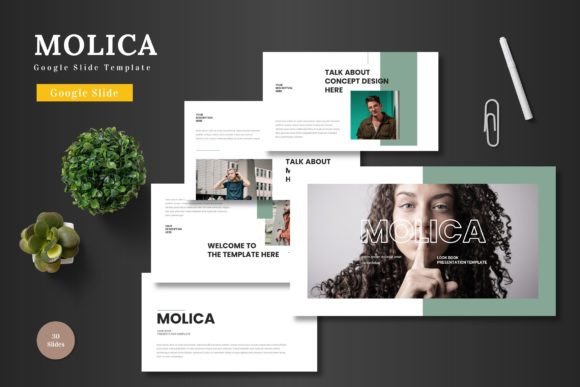
The Molica - Google Slide Template is built on the principle that great design should be accessible and adaptable. It’s a collection of over 150 slides, meticulously organized into five distinct color schemes. This isn't just a single deck; it's a comprehensive toolkit. Each of the five premade templates contains 30 unique slides, giving you a vast library of layouts to choose from. Whether you need a clean title slide, a data-driven chart, a compelling infographic, or a sleek gallery to showcase your work, the options are there. The design philosophy is clean and modern, focusing on clarity and impact. Scalable vector shapes ensure that every element, from icons to diagrams, looks crisp on any screen, from a laptop to a large conference display.
Beyond the Business Pitch: Versatility in Action
While its name might suggest a primary focus on business, the applications for this template extend far and wide. Its modular nature makes it a valuable design asset for a multitude of projects. Consider these practical scenarios where a polished presentation makes all the difference.
- Entrepreneurs & Startups: Perfect for crafting investor pitch decks that command attention. Use the infographic slides to simplify complex market data and the portfolio layouts to highlight your product's features.
- Marketers & Content Creators: Develop engaging webinar presentations, social media carousels (by exporting individual slides), or detailed campaign performance reports. The consistent visual language strengthens brand recognition across platforms.
- Educators & Trainers: Design interactive workshop materials, online course modules, or conference talks. The section break slides help organize content logically, improving information retention for your audience.
- Freelancers & Agencies: Create professional client proposals, project showcases, and service menus. The ability to easily drag and drop your own images into placeholders means you can personalize it for each client in minutes.
- Personal Projects: From planning a wedding or a community event to creating a digital scrapbook or a family history timeline, the template provides a beautiful canvas for your personal stories.
The Practicality of Google Slides Integration
One of the most significant advantages of the Molica template is its native integration with Google Slides. This eliminates the friction often associated with premium design assets. You don’t need to own or learn complex, expensive software. If you have a Google account, you can start editing immediately. All elements are editable directly within the Slides interface. Changing colors to match your brand’s hex codes, resizing graphics, replacing placeholder images, and inputting your text is straightforward. This accessibility is a game-changer for small business owners, bloggers, and hobbyists who may not have a dedicated design team. The included animated slides add a layer of polish, allowing you to create dynamic, engaging presentations that hold your audience's focus.
Building a Cohesive Brand Identity
Consistency is the cornerstone of strong branding. Using the Molica template across your various presentations helps reinforce your visual identity. By selecting one of the five color schemes and sticking with it, you create a recognizable look for your business communications. This visual consistency extends to how you use typography. While the template itself focuses on layout and graphics, pairing it with a complementary font family is crucial. A clean sans-serif font often works well for body text to maintain readability, while a distinctive display or serif font can be used for headlines to inject personality. Think of the template as the stage and your chosen typeface as the voice of your speaker—both need to work in harmony to deliver a clear, impactful message.
Making the Design Your Own
The true power of a resource like this lies in how you customize it. The template provides the structure, but your content and branding choices bring it to life. Start by selecting the color scheme that best aligns with your project's mood—be it professional, creative, or energetic. Then, focus on the content. Use the handcrafted infographics to present statistics in a more digestible way. Leverage the portfolio slides to create a visually compelling case study. The drag-and-drop picture placeholders are particularly useful for maintaining a high-quality, professional look without needing advanced photo editing skills. Remember, the goal is not to use every single slide, but to curate the ones that best serve your narrative. This selective approach ensures your presentation remains focused and powerful.
In a world saturated with information, the way you present your ideas can be just as important as the ideas themselves. A well-structured, aesthetically pleasing presentation demonstrates professionalism, respect for your audience's time, and a commitment to quality. The Molica - Google Slide Template provides a robust, versatile, and user-friendly foundation to achieve exactly that. It empowers you to communicate with clarity and visual confidence, whether you're closing a deal, teaching a concept, or sharing a passion project. By combining its flexible design system with your unique content and brand voice, you can transform a standard presentation into a memorable experience that resonates and engages.