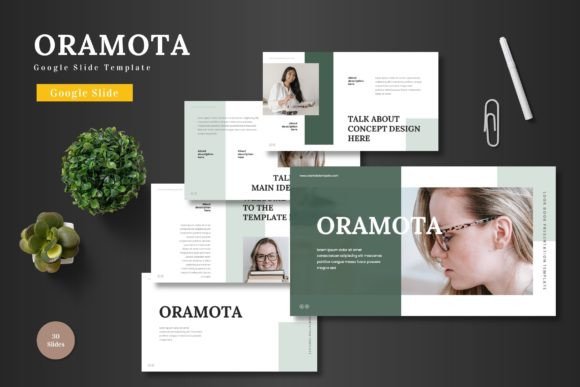
Oramota: A Clean, Scalable Google Slides Template for Modern Brands
Ever sat down to create a presentation and felt completely overwhelmed by the blank canvas? You have a brilliant idea, a product launch, or a business pitch to share, but the thought of designing 30 cohesive, professional slides from scratch is paralyzing. This is where a well-crafted template becomes more than a convenience—it becomes a strategic asset. The Oramota - Google Slide Template is built for exactly this moment, offering a structured yet flexible foundation that lets your content shine without the design headache.
Beyond Aesthetics: The Practical Power of a Polished Presentation
A presentation is often the first serious touchpoint for an investor, a client, or a new team. It’s not just about looking good; it’s about communicating clarity, competence, and confidence. Oramota’s design philosophy centers on clean lines, scalable vector elements, and a balanced color palette. This means your quarterly business review won’t just share data—it will present it in a way that’s easy to digest and remember. The pixel-perfect illustrations and handcrafted infographics aren’t decorative; they’re tools to simplify complex information, making your message stick.
Think about the last pitch deck you saw. Was it cluttered? Did inconsistent fonts distract you? Oramota eliminates these issues by providing a master slide system. Change the font style once on the master, and it updates across all 30 slides. This single feature is a game-changer for maintaining visual consistency and brand recognition. Whether you're a solopreneur establishing your brand identity or a marketing team aligning assets, this template ensures every slide feels intentionally part of the same story.
From Boardroom to Instagram: Versatile Design Applications
The true value of a design asset lies in its adaptability. While Oramota is a Google Slides template, its utility stretches far beyond a formal presentation. Its clean, modern typeface and structured layouts make it a versatile starting point for a range of creative projects. Consider these real-world applications:
- Brand Guidelines & Style Guides: Use the consistent slides to document your color schemes, font pairing rules, and logo usage, creating a professional manual for your team or clients.
- Social Media Graphics: Export individual slides as high-quality images for Instagram carousels, LinkedIn posts, or Pinterest pins. The cohesive design will make your feed look curated and professional.
- Digital Products & E-books: Structure an e-book, a workshop guide, or a set of worksheets. The sections and gallery slides are perfect for creating visually engaging digital downloads.
- Internal Communications: Transform weekly team updates, project kickoffs, or training materials into clear, engaging documents that people actually want to read.
For a small business owner, this means one template can serve multiple needs, saving time and ensuring a unified look across all your marketing assets. The picture placeholder drag-and-drop feature is particularly useful for quickly updating product shots or team photos without wrestling with alignment tools.
Designing for Clarity: How to Choose and Use Your Slides
With 150+ total slides and five color variations, the possibilities can feel vast. The key is to start with your goal. Are you creating a pitch deck to secure funding? Focus on the slides that highlight problem, solution, market size, and traction. Is it a product promotion? Lean into the gallery and portfolio slides to showcase high-quality images. The template’s structure is your guide, not your prison.
A critical, often overlooked aspect is readability. Oramota’s design prioritizes clear hierarchy and ample white space, but you must maintain that. When adding your content, resist the urge to fill every inch. Let the breathing room exist. Choose font sizes that are legible even in the back of a conference room. The template’s modern, clean aesthetic naturally supports this, but your content choices are what complete the picture.
Before finalizing, always test your presentation. Review it in presenter mode to check the flow. Ask a colleague if the key takeaway is immediately clear. This simple feedback loop can transform a good presentation into a persuasive one.
Streamlining Your Workflow: The No-Fuss Editing Experience
One of the standout features of this package is its commitment to simplicity. Every single element is editable directly within Google Slides. There’s no need to juggle between PowerPoint, Adobe Illustrator, or other complex software. Need to change the primary color to match your brand’s hex code? Edit the master slide. Want to swap out an infographic icon? It’s a resizable, editable vector. This frictionless workflow is invaluable for busy professionals, from content creators to creative entrepreneurs, who need to produce polished work efficiently.
The included readme file with font and photo information is a thoughtful touch, ensuring you can perfectly replicate the template’s look or legally source the same assets. It underscores the template’s nature as a premium design asset, built with practicality and professional standards in mind.
Final Thoughts: More Than Just Slides
Ultimately, the Oramota - Google Slide Template is a toolkit for effective visual communication. It’s not about having the flashiest animations; it’s about providing a clean, professional, and incredibly adaptable framework. It helps you present your ideas, your brand, and your business with the clarity and confidence they deserve. Whether you’re drafting a crucial business proposal, designing a course curriculum, or creating a portfolio for your next client, this template provides the polished foundation to build upon. It’s the kind of reliable design resource that earns its place in your digital toolkit, ready to help you turn a blank slide into a compelling narrative.